

The Missing Playbook for Leading a Team Through AI
AI burnout is real but this playbook helps leaders design systems to manage through it

The more customers I work with, the more I’m a believer that AI is less about building individual AI employee skills and more about rethinking group operating structures around AI infusion. Leaders have a tough job right now, but there is a path forward.
What I’m covering in this newsletter:
The AI burnout is real and shouldn’t be ingored
Why AI leadership is a team design discussion and not an individual initiative
What a group operating structure can look like
Actions leaders can take today to get started
I had two speaking engagements this week that were an interesting dichotomy of perspectives. I spoke to a classroom of junior and college seniors who are navigating an entry into the workforce like no other generation before them. Then the next day I spoke to a group of highly experienced senior marketing leaders who are navigating management of a new type of work like no generation before them has had to do.
Then there are friends of mine that are just worn out reading about it.
I know the AI burnout is real. It’s heavy.
While I can’t control that, I can control putting out AI content, frameworks, and systems that help people navigate these uncharted waters. I maintain that great AI adoption can mean up-skilling for employee careers and true measurable results towards a company’s objectives.
I want to focus this week on leaders navigating a new era of work.
If you manage a team right now, you’re getting it from both sides.
From above, the pressure is to drive AI adoption, show productivity gains, show how your team is using it and demonstrate ROI.
From below, the anxiety is real. Your people are watching layoffs at other companies get blamed on AI. They’re reading about which jobs disappear next. Some of them are quietly burning out trying to figure out which AI tool will make them indispensable. Others are quietly hoping it’ll all blow over.
You’re stuck in the middle and no one trained you for this. There isn’t a playbook yet.
So most managers do what’s reasonable in the absence of a system. They look for people to try things, to figure it out and bring back what works.
I think that’s the move that’s quietly burning everyone out.
Let’s dive into a system to fix that.
Glad you’re here and thank you for reading Approachable AI by Pat Schaber! In case you missed some recent articles, here’s a recap:


Why individual AI effort isn’t working
When you tell people to figure out AI on their own, three things happen.
They build private workflows nobody else sees, so the team gets zero compounding benefit.
They hide their experiments because they don’t want to look stupid in front of peers.
They get exhausted, because learning a new technology while still doing your day job is a lot to carry.
Plus, this does not all happen in equal measure across every employee. Does this look familiar?
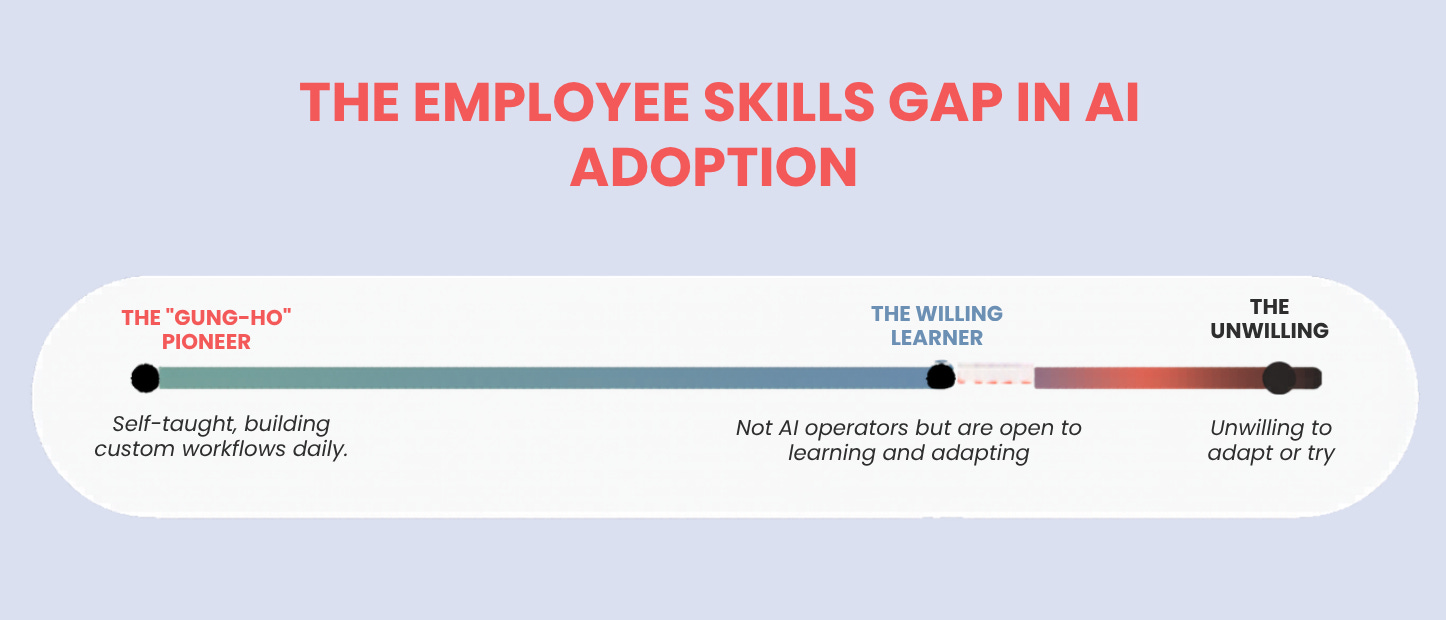
The business world is asking leaders and managers to reshape how their group thinks and works while still managing how their group currently thinks and works. With a wide disparity of skill sets on top of it.
That’s a heavy load!
Reframe AI adoption as a systems problem
Here’s where I’d push you to flip how you’re thinking about this.
Treat AI adoption as a systems design discussion, because that’s what it is.
Your job as the leader is to build a team operating system. A shared way of working with AI that lets your group learn, calibrate, and improve together. The companies and teams winning with AI right now share a way of working with it. Individual AI skills matters far less than the collective architecture around it.
This is how I challenge leaders to think about this. Stop optimizing for individual capability and start designing the team OS.
Let’s examine what an AI system architecture can look like.
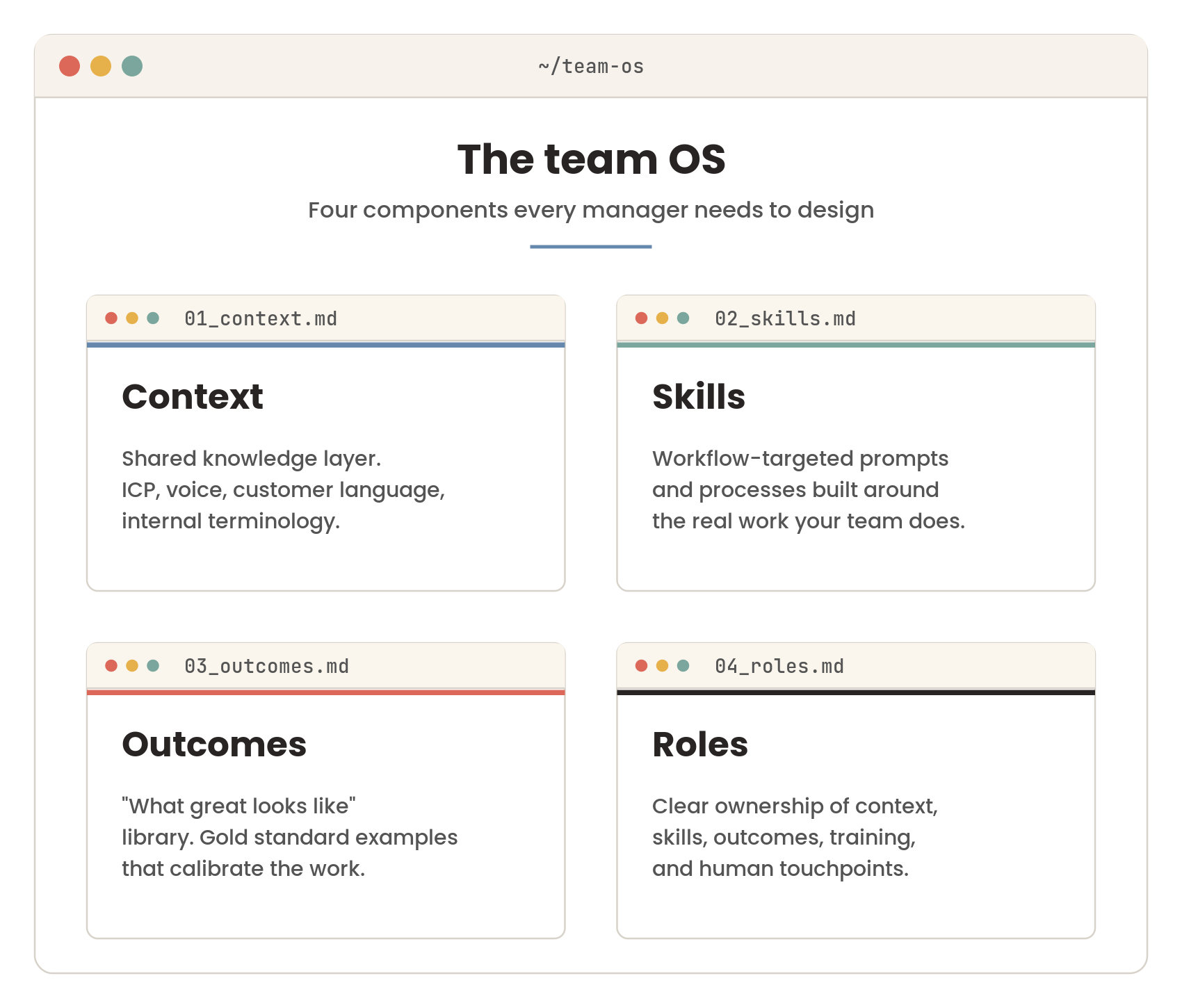
Four main components of a team AI OS
A working team OS for AI has four pieces. Each one needs to exist deliberately.
Context
I don’t care what LLM you’re using at your company. Context is still the key component to get the best outcome.
Context is the shared knowledge layer your AI uses to do anything useful.
Your ICP
Your customer language
Your brand voice
The internal terminology your team uses every day
The way you describe your product
The way your buyers describe their problems.
Without a shared context layer, every AI output is generic. With one, every output starts from your team’s actual reality and your team needs to own this.
This lives in shared files the whole team can access and update. Owned together, maintained together, treated as the team’s source of truth.
Skills
Skills are the prompts, workflows, and processes your team uses to actually get work done with AI. Built around the real work your team does.
A skill might be:
Qualify an inbound lead from a webform
Draft a follow-up email after a discovery call using the meeting notes
Rewrite a sales asset for a specific industry vertical
These are documented, versioned and improved over time. New team members get the skills on day one. Veterans contribute new ones as they figure out what works.
Remember, many of these skills will cross-employee function, so it’s important the engagement across the team is high on the development of them.
Outcomes
This is the “what great looks like” library. Gold standard examples of finished work, so the AI has something to calibrate against and so the team has a shared definition of quality.
What does an excellent qualification email look like?
An excellent case study?
An excellent pricing summary?
Most teams don’t have these examples written down anywhere. They live in someone’s head, or in a folder of stuff that worked once.
Pull them out, put them in the OS, point your AI at them. The output gets dramatically better. So does the team’s shared understanding of what they’re aiming for.
Team Roles
None of this happens on its own and they’re not set-it-and-forget-it pieces. Someone has to own each piece. This is also a great opportunity for employee upskilling.
Five roles to define explicitly:
Context owner: Keeps the shared files current. Makes sure new ICP changes, brand updates, and customer language get reflected.
Skill developer: Builds new workflows. Tests them. Documents what works. Pushes them out to the team.
Outcome owner: Maintains the gold standard library. Decides what makes the cut.
Team trainer: The early adopter who teaches others. Usually emerges naturally, but you have to give them the time and authority to do it.
Human touchpoint owner: Defines where humans review, decide, and own the relationship. More on this in a minute.
On a small team, one person can wear multiple hats. The point is that the roles exist on paper, with names next to them, so things actually get owned.
This is also part of the ongoing challenge that managers will face as far as rethinking work and roles on their teams.
The human touchpoints piece
This is the part I’d encourage you to spend the most time on, because it’s where employee anxiety actually gets resolved.
Most of the fear about AI in your team comes from one specific thing: nobody is telling them where their job still lives.
When you define touchpoints explicitly
This is where the human reviews the AI output
This is where the human decides which path to take
This is where the human builds the customer relationship
This is where the human owns the judgment call
the fear drops fast.
Your team can see where they’re amplified by AI, with their judgment still at the center of the work.
Treat touchpoints as a specific deliverable. List the moments in each workflow where a human stays in the loop and why. Document them. Make them visible to the team. That’s the fastest path to reducing anxiety while still moving forward.
Where to start this week
You don’t need a 90-day rollout plan. You need to start designing.
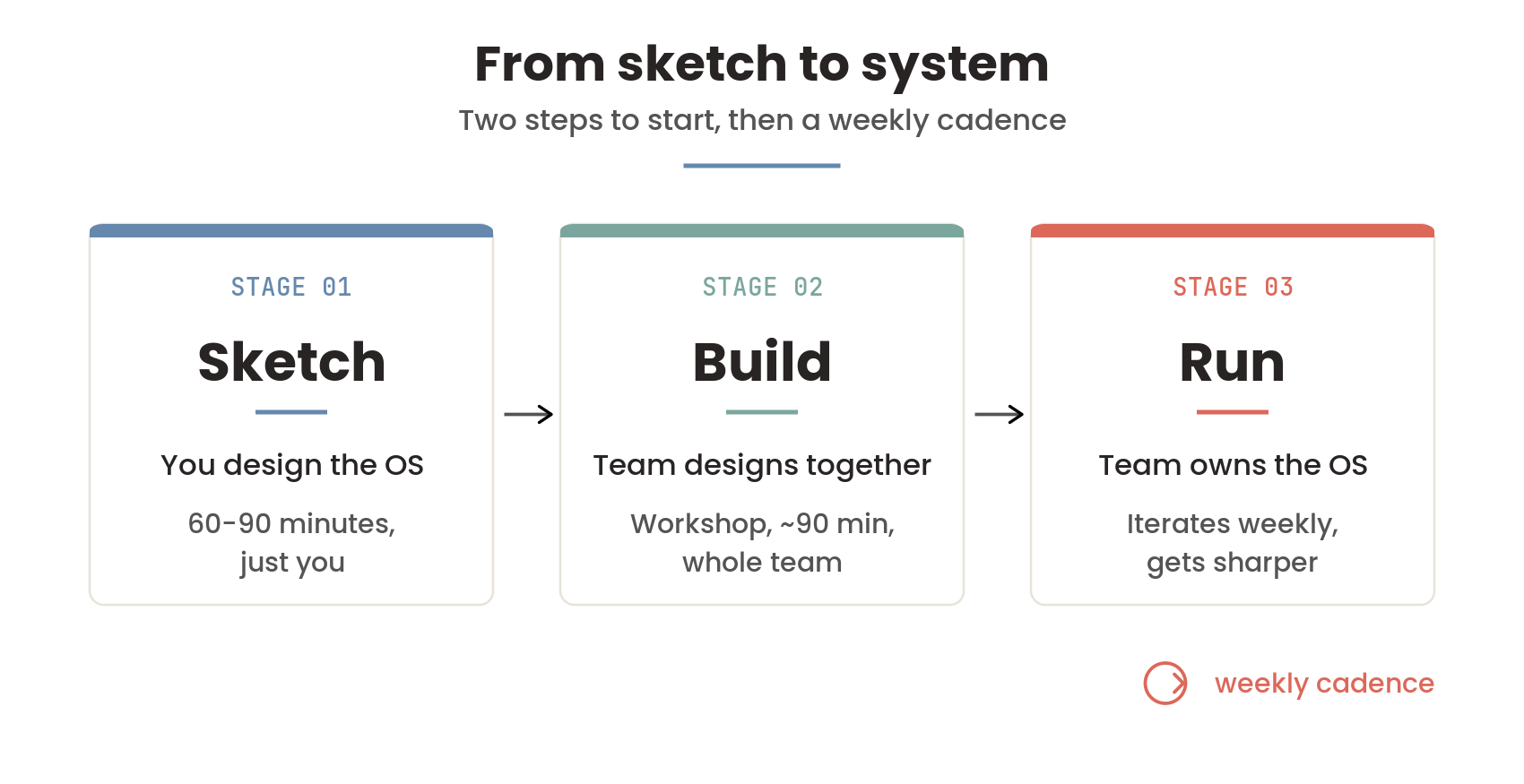
Step one. Sit with the four components yourself first.
Block 60 to 90 minutes of focused time. Just you. Walk through each component for your team:
What should be in our shared context layer? What does our AI need to know about us, our customers, our voice, our work? (also marketing 101)
Which workflows would benefit most from AI skills? Where is the actual friction in our week?
What does great look like for each of those? Do I have examples I can point to?
Who on my team should own which roles?
You don’t need perfect answers but I’d recommend a working draft. This is design work, and it’s yours to do as the manager.
Step two. Run a workshop with the team
Bring your draft to the team. Pick two or three processes that need real improvement, and redesign them together with AI infused. Use the workshop to surface:
what context is missing
what skills you need to build first
what great actually looks like
who’s going to own what
how do we measure ROI
The system architecture builds from that workshop. The team owns it because they helped design it. Then you keep iterating, weekly or biweekly, as the team gets sharper.
That’s the playbook. Manager designs first. Team shapes it together. The OS gets better every week.
This shift
The change I’m asking you to make is small, but it changes everything.
Stop trying to make your people AI-savvy individually. Build the conditions where your team gets better together and grows together. That’s what leading a team through AI actually looks like.
The technology is moving fast. Your team is allowed to be uncertain about it. So are you. The leaders coming out ahead are the ones who built the systems that let their teams figure it out together.
That’s the PLAYBOOK!

Ways to Work with Me
Quick Win Session
A focused, high-impact working session designed to identify one immediate AI opportunity and give you a practical roadmap you can implement right away.
AI Readiness Assessment
A structured evaluation of your people, processes, data, and tools to determine where AI will create the most value and what needs to happen before you scale.
Workshops & Projects
Hands-on, team-based engagements that turn AI from theory into execution through tailored workshops, use-case design, and guided implementation.
Fractional AI & Marketing Leadership
Ongoing executive-level support that embeds AI strategy, operational rigor, and revenue-focused marketing leadership directly into your business.
AI Tech I’m Currently Using
I get quite a few questions on Substack, LinkedIn, and through my website on what AI tools I use for what use cases. I’ll try to share a few in each newsletter so it will give you some ideas of tools you can try for specific purposes. Here are a few for this week:
Everyday LLM - ChatGPT and Claude: I cover a lot of this above so won’t dive in too far here.
Call and Meeting Transcriptions - Granola: I like Granola for a couple of reasons. It takes the transcription and rolls it up into very good notes and action items but doesn’t need to be added to a meeting as an attendee. Also, it syncs great with my Hubspot CRM which makes it very easy to send notes to the contact record.
Presentations / Branded Documents - Gamma.app: I use this 3-4 times a week for anything I do with client presentations or professional document creation. I cover why I’m a heavy Gamma user in this post:

Video Recording / Editing - Descript: I’m trying to work in time to my weekly routine for video creation. I feel it’s important to give people a more personal connection. Descript is a huge timesaver. Imagine being able to erase or add text from a script and have it be reflected in the actual video in seconds. Unbelievable.
Sales Prospecting - Apollo.io and Clay: I don’t do a ton of outbound prospecting for my business but I’ve been using the free versions of Apollo.io and Clay to find companies that I could get to know through LinkedIn that may be interested in my services. I’m only touching on a sliver of the capabilities of these tools.
the hardest part of any leadership playbook for AI is that the team's burnout and the tooling's failure mode look identical from the outside. different fix, same symptom.